Manuel de réparation de la Toyota Prius 2018: Camera De Television
Pieces Constitutives
PIECES CONSTITUTIVES
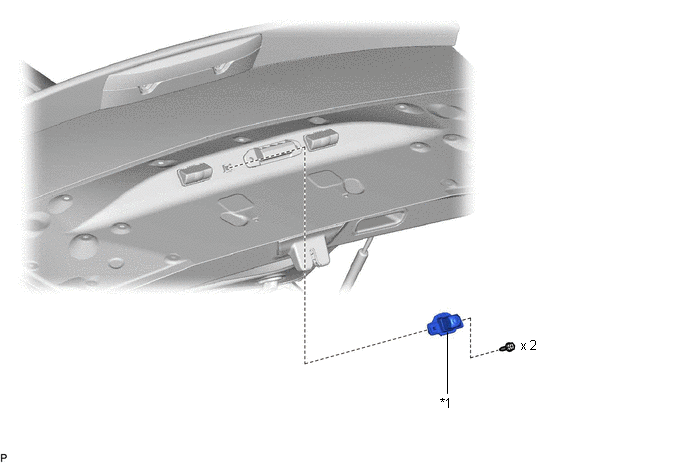
SCHEMA
|
*1 | ENSEMBLE DE CAMERA DE TELEVISION ARRIERE |
- | - |
Depose
DEPOSE
PROCEDURE
1. DEPOSER LE SOUS-ENSEMBLE DE GARNISSAGE EXTERIEUR DE PORTE DE COFFRE
Cliquer ici

2. DEPOSER L'ENSEMBLE DE CAMERA DE TELEVISION ARRIERE
| (a) Débrancher le connecteur. |
|
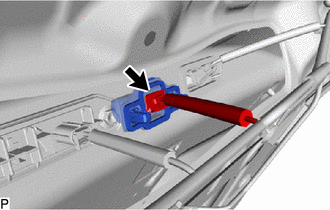
| (b) Déposer les 2 vis. |
|
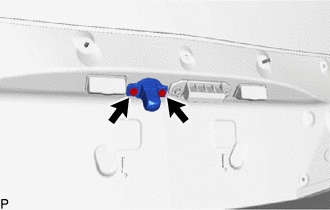
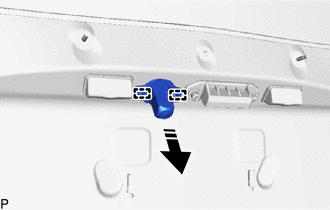
(c) Libérer les 2 guides pour déposer l'ensemble de caméra de télévision arrière comme indiqué sur le schéma.
 |
Déposer dans ce sens |
Repose
REPOSE
PROCEDURE
1. REPOSER L'ENSEMBLE DE CAMERA DE TELEVISION ARRIERE
(a) Engager les 2 guides pour reposer provisoirement l'ensemble de caméra de télévision arrière comme indiqué sur le schéma.
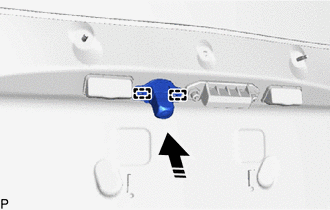
 |
Poser dans ce sens |
(b) Reposer l'ensemble de caméra de télévision arrière avec les 2 vis.
(c) Brancher le connecteur.
2. REPOSER LE SOUS-ENSEMBLE DE GARNISSAGE EXTERIEUR DE PORTE DE COFFRE
Cliquer ici

 Avertisseur Sonore De Distance
Pieces ConstitutivesPIECES CONSTITUTIVES SCHEMA
*1 SOUS-ENSEMBLE INFERIEUR DE TABLEAU DE BORD
*2 SIGNAL SONORE D'AVERTISSEMENT DE DISTANCE N° 1
*3 SIGNAL SONORE D'AVERT ...

D'autres materiaux:
Batterie De Secours
Pieces ConstitutivesPIECES CONSTITUTIVES SCHEMA
*1 BATTERIE DE SECOURS AVEC SUPPORT
*2 SOUS-ENSEMBLE INFERIEUR DE TABLEAU DE BORD SCHEMA
*1 BATTERIE DE SECOURS
*2 SUPPORT DE TELEPHONE N° 3
*3 SUPPORT DE TELEPHONE N° 4
- - DeposeDEPO ...
Schema Du Systeme
SCHEMA DU SYSTEME
Voici un schéma détaillé relatif à l'ECU de certification (ensemble d'ECU de clé intelligente).
Voici un schéma détaillé relatif à l'ECU de carrosserie principale (ECU de carrosserie du réseau multiplex).
Pièce constitutive ...
Message de perte de communication avec le module de commande du moteur d'entraînement "A" (U011087)
DESCRIPTION DU CONTROLE L'ECM
et l'ensemble d'inverseur avec convertisseur (ECU MG) transmettent et
reçoivent également les signaux via la communication CAN. Si
une erreur de communication se produit entre l'ECM et l'ensemble
d'inverseur avec convertisseur, l'ECM allume le MIL et enregistr ...